GFCI and AFCI Breaker Reset Guide — What the Test Button Does and the Correct Reset Sequence
A circuit breaker with a test button behaves differently from a standard breaker, and that difference trips up a lot of homeowners during a power outage. The test button on a breaker is not a reset button — pressing it deliberately trips the breaker to verify the protection is working. The actual reset sequence requires pushing the handle firmly past the tripped position to full OFF before switching back to ON. Skipping that step is exactly why so many people find that a circuit breaker with a test button will not reset after following the usual procedure.
This guide covers what the test button on a circuit breaker actually does, the correct step-by-step sequence to reset a circuit breaker with a test button, the most common reasons it won’t stay reset, and when the problem points to something beyond the breaker itself.
What Is the Test Button on a Circuit Breaker?
The test button is a built-in diagnostic feature on GFCI (Ground Fault Circuit Interrupter) breakers, AFCI (Arc Fault Circuit Interrupter) breakers, and combination AFCI/GFCI breakers. Each uses the button for the same purpose: simulating a fault condition to confirm the protection mechanism responds correctly.
GFCI Circuit Breakers
Detect ground faults — unintended current paths that create shock hazards in wet locations. Pressing the test button simulates a ground fault, tripping the breaker the same way a real fault would.
AFCI (Arc Fault) Breakers
Detect hazardous arcing in wiring. The test button triggers the arc-detection circuitry to verify it responds to a simulated arc event. Required in bedrooms, living rooms, and most finished living spaces under current code.
Combination AFCI/GFCI
A single test button exercises both detection systems simultaneously. Both 15 amp and 20 amp circuit breakers with test buttons follow the same reset procedure regardless of amperage rating.
What a Tripped Test-Button Breaker Looks Like
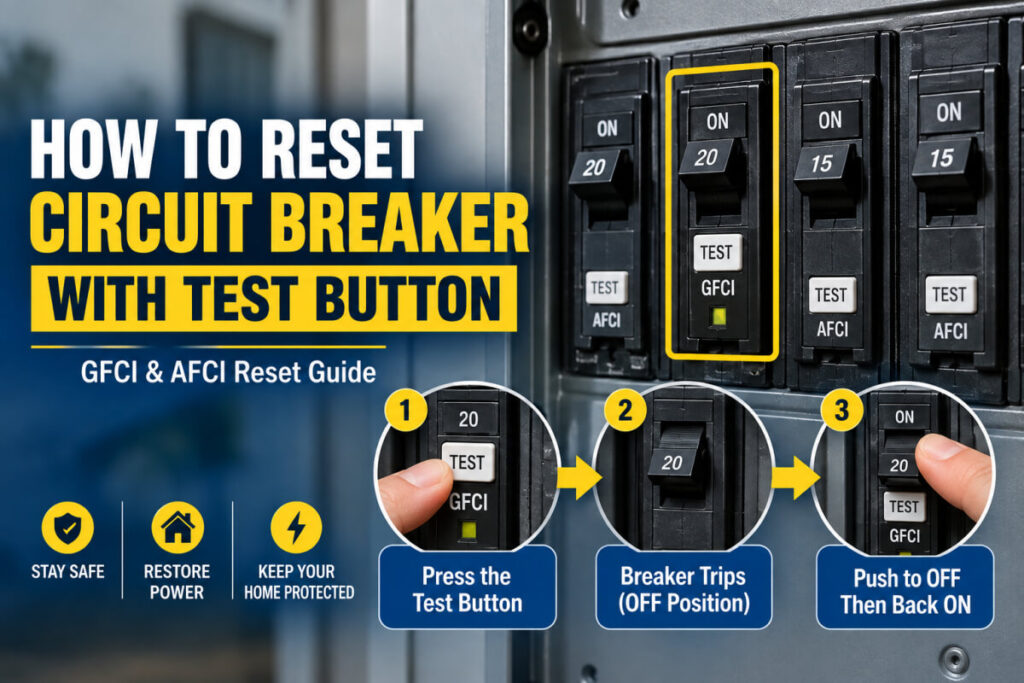
When a test-button breaker trips — from the test button or from an actual fault — the handle moves to a middle position between ON and OFF. On some panel designs, a red indicator window becomes visible. The critical detail: a tripped breaker with a test button cannot be reset by pushing directly from the middle position to ON. It must first be pushed firmly past the middle to a fully seated OFF position — only then will the internal mechanism allow it to move to ON. Opening the panel door and identifying which breaker has shifted is always the first practical step before attempting any reset.
How to Reset a Circuit Breaker with a Test Button — Step by Step
- Identify the tripped breaker. Look for a handle sitting between ON and OFF. On panels with indicator windows, a red flag confirms the tripped state.
- Unplug or switch off devices on the affected circuit. If a faulty appliance caused the trip, leaving it connected will trip the breaker again the moment power restores.
- Push the handle firmly to the full OFF position. Push past the tripped middle position all the way to OFF — you should feel and hear a distinct click when it seats fully. This is the step most people miss.
- Wait a few seconds. If the breaker tripped from a sustained overload, the thermal element may need a brief moment to cool before the reset will hold.
- Push the handle firmly to ON. Move from full OFF to ON in one confident motion. You’ll feel a click as it seats in the ON position.
- Confirm power is restored. If the breaker holds, reconnect devices one at a time to identify any that immediately trip it again — that device is likely the source of the original fault.
Why a Circuit Breaker with a Test Button Will Not Reset
- Handle not pushed all the way to OFF first. The most common cause. Push firmly past the middle position to full OFF — feel the click — before attempting ON again.
- A fault is still present on the circuit. A damaged appliance, wiring short, or ground fault still connected will trip the breaker immediately on reset. Disconnect all devices, reset, then reconnect one at a time.
- The breaker is overheated and needs to cool. A breaker that tripped from sustained overload may need a few minutes before its thermal mechanism will hold a reset.
- The breaker itself has failed. A GFCI or AFCI breaker that won’t reset even with all devices disconnected and the correct OFF-first procedure followed has likely failed internally. These have a limited trip-cycle service life.
AFCI Breaker Reset vs. GFCI Breaker Reset
The reset procedure is identical for both types — fully to OFF, then firmly to ON. The difference is what causes them to trip. A GFCI breaker trips from current imbalance between hot and neutral, indicating a ground fault. An AFCI breaker trips from arc-fault signatures in the wiring. If an AFCI breaker keeps tripping repeatedly with no obvious overload, it’s detecting something in the wiring that warrants investigation before concluding the breaker is faulty.
What to Do If the Test Button Doesn’t Work
Monthly testing is recommended for GFCI and AFCI breakers. Press the test button — the breaker should trip and cut power. Then reset using the sequence above. If pressing the test button doesn’t trip the breaker, the protection circuit has failed and the breaker needs to be replaced. A GFCI or AFCI breaker that can’t trip on its own test is no longer providing the protection it’s rated for.
When to Call a Licensed Electrician
- The breaker trips again immediately after a correct reset with all devices disconnected
- The breaker won’t reset at all even with the correct OFF-then-ON procedure
- You see burn marks, smell burning, or notice discoloration near the breaker or panel
- Multiple breakers are tripping simultaneously
- You need to replace a failed GFCI or AFCI breaker — these require correct specification matching and safe panel work
Frequently Asked Questions
What Does the Test Button on a Circuit Breaker Do?
It deliberately trips the breaker to simulate a fault and confirm the protection circuit is active. It is not a reset button — pressing it cuts power, it does not restore it.
How Do I Reset a Breaker with a Test Button?
Push the handle firmly to full OFF first — past the tripped middle position — then switch to ON. If it won’t hold, disconnect all devices on the circuit and check for a persistent fault before trying again.
Why Won’t My Circuit Breaker with a Test Button Reset?
The most likely causes: handle not fully seated to OFF before switching to ON, a fault still present on the circuit, or the breaker has overheated. A breaker that won’t reset with no load attached may have failed internally and needs replacement.
How Do I Reset the Main Breaker?
The main breaker follows the same OFF-then-ON sequence. Before resetting, turn off all individual branch breakers to reduce inrush, reset the main, then restore branches one at a time. If the main trips repeatedly, contact an electrician.
Is It Safe to Keep Resetting a Tripped Breaker?
Resetting once after confirming no obvious overload is safe. Repeated resets without finding the cause stress the mechanism and can mask a wiring fault that requires professional diagnosis.
Need Reliable Breakers for Your Panel?
Dvolt manufactures MCBs, RCCBs, and switching components built for consistent performance in residential and commercial electrical panels.
Contact Our Team Browse Our MCBsFinal Thoughts
Resetting a circuit breaker with a test button comes down to one detail most people miss: push all the way to OFF before switching to ON. The test button is a diagnostic tool, not part of the reset sequence. If the breaker holds after resetting, reconnect devices one at a time to isolate any that trip it again. If it won’t hold at all with no load connected, the fault is still present or the breaker needs replacing.